Review Comments (6) Screenshots (3) Questions & Answers (0) Votes (1) Awards (1) Wiki  
-Please log in to rate
3 3/5 (1)
-Dell Inc.
-1.3.1
- support.dell.com
-Freeware
- 1 920 person
Download Dell ControlPoint...

401 MBDownloaded 5117 times


Review

This review applies to version 1.0 The latest version of this software will soon be reviewed by our informers.

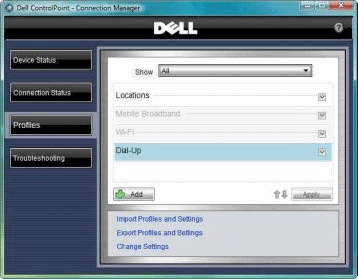
The Dell ControlPoint (DCP) Connection Manager is part of a multipurpose utility called Dell ControlPoint, which includes a Security and System Manager. The connection Manager application enables you to easily set-up and automate their network connections and profiles from a single utility. The DCP Connection Manager replaces multiple utilities that were required in the past to configure network connections and settings. The connection manager helps manage the following connection types and settings:
Wi-Fi
Mobile Broadband
Dial-Up
Ethernet or Wired (Cable Broadband, DSL)
Bluetooth or Ultra Wide Band (UWB)
GPS
Printer
Internet Browser & Security
Virtual Private Network (VPN)
Share Folders
Map Network Drives
Dell Controlpoint Connection Manager comes preinstalled in Dell's new Latitudes and Precision portables,it can be reinstalled using Dell Resource CD or downloading each application on Dell Website.
Dell Controlpoint Connection Manager is compatible with Windows XP or Vista but cannot be installed in previous Latitude series.
Advantages
  • User Friendly.
  • All your network needs in a single utility.
Disadvantages
  • A 400 mb download for just the Connection Mananger.
  • Not compatible with previous Latitudes and Precision Portables.

Reviewed by: Jean De Los Santos

Reviewer rating: Editor's rating 5

Screenshots

Profile Screen Profile Screen Connecting to a Wireless Network Connecting to a Wireless... Connection Status Connection Status

Latest comments

Tony Orlando(beginner) 2 months ago 
New Dell 6400 and the wirless connection was always dropping and was very slow. I first tried disabling the Dell Control Point Connection manager but still the same. Finally uninistalled it and everything works fine.
Tim Tong(beginner) 3 months ago 
Brand new E5500. I bought dell to not encounter these stupid driver problems. But I was wrong. How can it have such slow wireless network settings. Can not be the router because my sony laptop is blazing , and it is on a slower connection speed.
I tried uninstall Dell control point - still having speed problems. Will have to call tech support again... here we go again...
droyalty(beginner) 4 months ago 
Depending on the provider and the model number of the mobile broadband modem, other utilities exist to drive the mobile broadband. You really don't even need a utility if you know how to setup a manual dialup connection for the modem. I'm building a webpage specifically devoted to mobile broadband on Dell. It's not complete and will always be a work-in-process. There may be info there that will help with issues. http://dell.webhop.net
Add new comment All 6 comments
Tag cloud
Download siClient

Email Address:

Password:

Register now »

Forgot password?

Copyright © 2009, Informer Technologies, Inc. About| Privacy and terms| Help| Feedback